IBM MaaS360
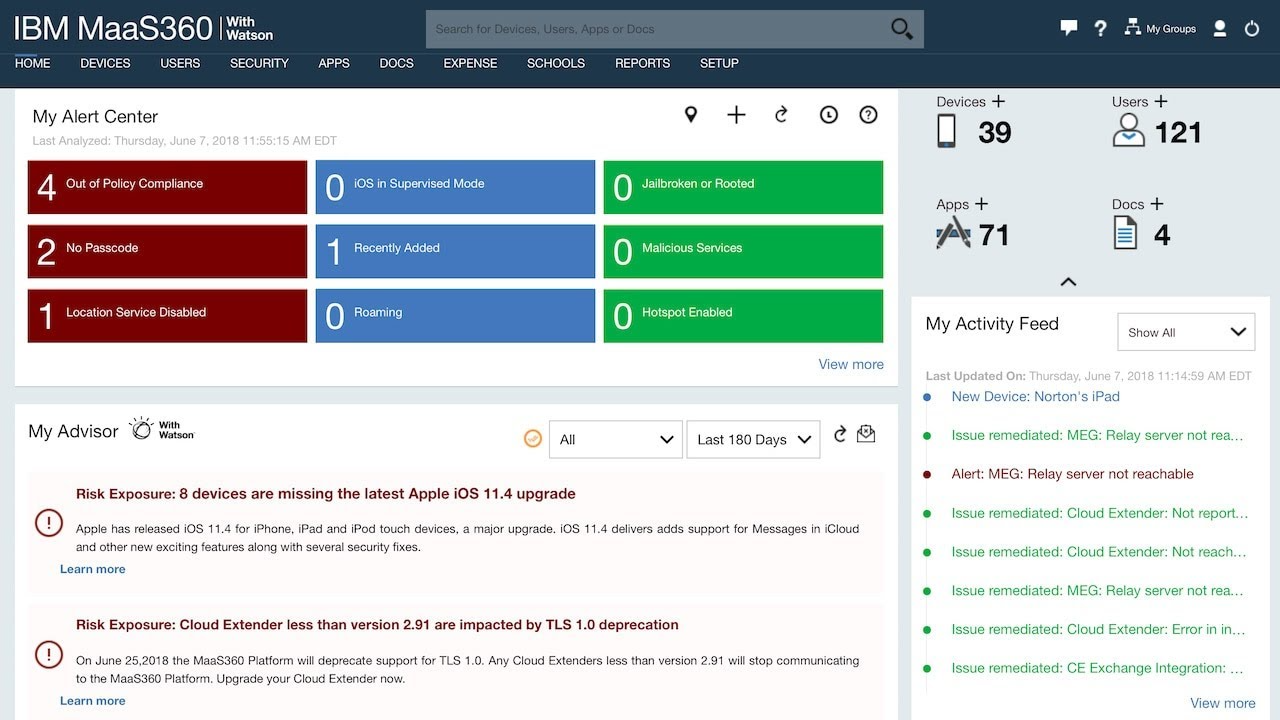
IBM's AI-powered UEM with Watson analytics and one of the few platforms managing ChromeOS.

Key Takeaways
Who It's For
IBM MaaS360 is designed for organisations managing chromeos alongside ios/android/windows, ibm ecosystem customers. IBM's AI-powered UEM with Watson analytics and one of the few platforms managing ChromeOS. The platform offers a 30-day free trial, limited sandbox, so you can evaluate it before committing.
At a Glance
- Best For
- Organisations managing ChromeOS alongside iOS/Android/Windows, IBM ecosystem customers
- Setup Complexity
- Moderate
- Pricing Range
- $4-6/user/month depending on tier; enterprise custom quotes.
- Licensing Model
- Per-user licensing with tiered feature sets (Essentials, Deluxe, Premier).
- Top Strength
- ChromeOS management support differentiates from most competitors
- Trial
- 30-day free trial, limited sandbox
Buyers Guide
Download the full 2026 comparison spreadsheet with scores, pricing, and feature data for all 13 platforms.
Excel format
Score Breakdown
Scored across 10 categories based on 67 features evaluated per platform.
Pros & Cons
Based on our hands-on evaluation of IBM MaaS360.
Strengths
4- ChromeOS management support differentiates from most competitors
- Watson AI Advisor provides analytics-driven recommendations
- QRadar SIEM native integration for security-focused organisations
- Competitive tiered pricing starting at $4/user/month
Limitations
3- No Linux device management support
- More limited webhook and automation capabilities than enterprise leaders
- Multi-policy capability removed in recent versions (single policy per device)
How Does Your MDM Stack Up?
Wondering how your setup compares to IBM MaaS360? Take the Pain Point Challenge and find out.
Feature Breakdown
Individual feature scores across all 10 categories for IBM MaaS360.
Device Configuration
8 featuresSCEP certificate management and deployment.
Supports importing .mobileconfig profiles for both iOS/iPadOS and macOS devices. Windows custom configuration is more limited. Enables deployment of vendor-specific or advanced Apple payloads.
Device restrictions and capability enforcement.
Email configuration for native and managed clients.
Passcode policies with complexity enforcement.
Per-app VPN supported for iOS via VPN policy configuration. May require MaaS360 Enterprise Gateway or app wrapping depending on deployment model. Android and Windows per-app VPN not supported.
Device-wide VPN configuration supported.
Wi-Fi profile deployment across platforms including ChromeOS.
Enrollment & Provisioning
8 featuresAndroid Zero Touch Enrollment supported.
Apple Device Enrollment Program support for iOS and macOS via Apple Business Manager. Automated enrollment with profile assignment during device setup.
Apple Configurator enrollment supported for iOS bulk staging. CSV device import for pre-registration. Android bulk enrollment via NFC bump and QR codes for dedicated devices.
Conditional enrollment based on device/user attributes.
QR code enrollment available across supported platforms.
Samsung Knox integration for enhanced device management.
BYOD support with MaaS360 Container for secure app management.
Windows Autopilot supported for zero-touch Windows enrollment.
App Management
8 featuresApp restriction and blocklist policies.
Managed app catalog with self-service portal.
App configuration policies for iOS and Android.
VPP support for iOS only.
Google Play for Work app management.
Mobile Application Management via MaaS360 Container.
Silent app deployment and automatic updates.
Win32 application deployment on Windows.
Compliance & Security
8 featuresCompliance engine with real-time policy enforcement.
DLP not natively available.
Device encryption enforcement.
Geofencing not natively available.
Jailbreak and root detection enforcement.
Full device wipe capability.
Selective Wipe available across iOS, Android, Windows, and macOS per IBM device actions documentation. Removes corporate data and managed apps while preserving personal content on BYOD devices.
Watson AI Advisor with threat detection analytics.
OS Update & Lifecycle
6 featuresAndroid updates OEM-dependent; policy recommendations only.
Firmware updates not supported.
iOS update management with deferral options.
macOS update management.
Update deferral available on iOS, Windows, macOS.
Windows update management and deferral.
Reporting & Visibility
6 featuresApp deployment and usage analytics.
Audit logging for admin actions and policy changes.
Compliance status and remediation reporting.
Custom report builder for ad-hoc analysis.
Fleet inventory and status dashboards.
Real-time device status visibility.
Remote Actions & Support
6 featuresLimited custom scripting; Windows batch support only.
Remote restart available for Windows devices.
Remote device lock across platforms.
Remote support via TeamViewer integration for Android remote view/control, Windows, and macOS. iOS remote view available through TeamViewer but limited by Apple platform restrictions. Requires TeamViewer licensing.
Remote terminal not available.
Remote wipe and selective data removal.
Targeting & Policy Logic
5 featuresDevice type filtering for policy assignment.
Dynamic groups based on device attributes.
Geographic/network targeting not available.
Tag-based device targeting and policy assignment.
User and device group-based policy targeting.
Identity & Directory
6 featuresEntra ID integration via standard protocols.
Basic conditional access via policy rules; not as sophisticated as Intune.
Google Workspace for ChromeOS enrollment.
Third-party IdP support via SAML.
On-premises AD not directly supported.
SAML and OpenID Connect identity federation.
Integration & Extensibility
6 featuresLimited workflow automation; basic event triggers only.
No plugin framework available.
REST API available for device and policy management.
ServiceNow integration available.
QRadar SIEM native integration (IBM advantage).
Limited webhook support; basic event notifications only.
Video Resources
Watch IBM MaaS360 demos, tutorials, and reviews.
IBM MaaS360 Recorded Demo
Mobile Device Management with MaaS360 in Minutes
Alternatives to Consider
Other platforms to evaluate alongside IBM MaaS360.
Microsoft Intune
Strong ContenderThe Microsoft ecosystem's native MDM, deeply integrated with Entra ID and Microsoft 365.
Hexnode UEM
Strong ContenderThe broadest OS support at the best value, with excellent kiosk capabilities.
ManageEngine MDM Plus
Strong ContenderAffordable multi-platform MDM with strong Active Directory integration and a generous free tier.
User Reviews
Be the first to review IBM MaaS360
Your feedback helps other IT professionals make better decisions.
Write a Review
Share your experience with IBM MaaS360
Ready to decide?
Compare IBM MaaS360 Head-to-Head
See how IBM MaaS360 stacks up against Intune, Hexnode, ManageEngine in a detailed side-by-side comparison.